Last updated : 26/April/2020
Follow below steps to setup Spotify Music Player in a Gatsby site,
-
Create a account in Spotify
-
Create a new playlist
-
Search and Add songs to your playlist
-
Go to your homepage in Spotify, click Your Library and then your playlist and then click on the 3 dots(…) and from submenu, copy the playlist link
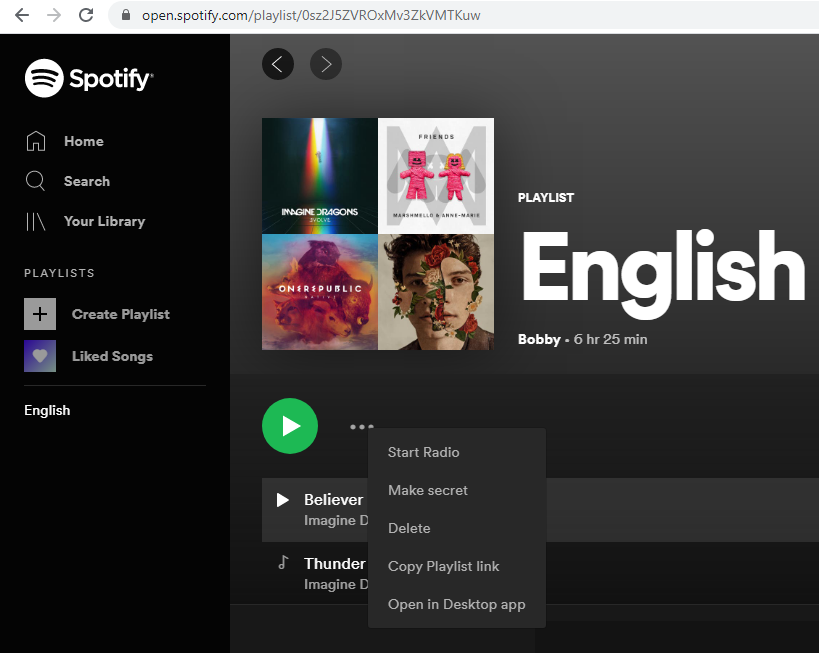
For me playlist link look like this,
https://open.spotify.com/playlist/0sz2J5ZVROxMv3ZkVMTKuw?si=jN0r2_DTSaal9A92sYf1VwUpdate the link like below(add
/embed/),
https://open.spotify.com/embed/playlist/0sz2J5ZVROxMv3ZkVMTKuw?si=Tg-Dup3iQ7ivdIGo1R5fAQNote : If you miss the above step, you will get to play only 30 seconds of song in Web player
-
Add this to your gatsby mdx file
import SpotifyPlayer from "./SpotifyPlayer"; <SpotifyPlayer uri="spotify:user:Bobby:playlist:0sz2J5ZVROxMv3ZkVMTKuw" size="large" theme="black" view="list" /> -
SpotifyPlay.jslooks like this
```js:title=content/pages/music/SpotifyPlay.js
/**- Spotify player iframe widget
- @author Alexander Wallin office@alexanderwallin.com
- @see https://developer.spotify.com/technologies/widgets/spotify-play-button/
*/
import React, { Component } from “react”
// Size presets, defined by Spotify
const sizePresets = {
large: {
width: 300,
height: 380,
},
compact: {
width: 300,
height: 80,
},
}/**
-
SpotifyPlayer class
*/
class SpotifyPlayer extends Component {
// ------------------------------------------------------
// Render
// ------------------------------------------------------render() {
// const { uri, view, theme } = this.props
let { size } = this.propsif (typeof size ===
string) {
size = sizePresets[size]
}return (
<iframe title="Spotify"
        src="https://open.spotify.com/embed/playlist/0sz2J5ZVROxMv3ZkVMTKuw?si=Tg-Dup3iQ7ivdIGo1R5fAQ"
        width="300" height="380" frameborder="0" allowtransparency="true"
        allow="encrypted-media">
</iframe>
)
}
}
export default SpotifyPlayer
```
All this in Spotify comes under Play Button.